A simple natural mapping which is promoted in the display is that between the push-button and speed bar controls of the 3d rotating scatterplot and the 3d point-cloud. The spatial proximity of the controls to the point-cloud strongly suggests that the cloud is indeed the target of the controls. This is preferable to placing the controls at a spatially distant location such as the Quail menubar. Items appear there principally because they apply generally to all statistical graphics at any point in the analysis. More complex examples of controls laid out near their targets are given in Oldford (1997).
Action items appearing on the menubar are typically spatially distant from their target
and so something like the selection constraint described in the last section becomes
necessary.
This constraint is made less artificial by consistently applying it.
Graphics which represent the same viewed object show themselves highlighted in all
displays when they are highlighted in one.
For example, all point-symbols representing the cases selected in the scatterplot show
themselves highlighted in all other visible displays in Figure ![[*]](http://www.math.uwaterloo.ca/latex2html-98/icons/cross_ref_motif.gif) .
Similarly, they share other display style properties such as size and shape.
This linking between graphics also occurs between graphics of different types
provided they have the same viewed object (e.g. point-symbols
and the case-labels of the case-list appearing on the right in Figure ).
.
Similarly, they share other display style properties such as size and shape.
This linking between graphics also occurs between graphics of different types
provided they have the same viewed object (e.g. point-symbols
and the case-labels of the case-list appearing on the right in Figure ).
Another means of reinforcing the rule that user selection determines the focus or target
is through pop-up menus associated with each graphical component in a display.
This is achieved by employing a `three-button' mouse.
Here left-button mouse click over a component selects that graphic and consequently
all information (viewed-object, etc.) attached to it. Middle-button selection pops
a menu up directly at the mouse position thus associating it spatially with the
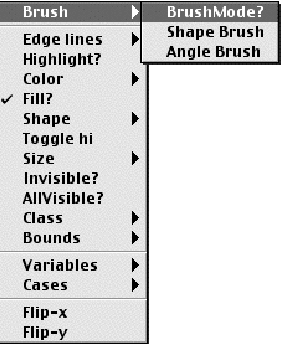
underlying selected graphic. Figure shows the menu which pops
up over a 2D point cloud such as that found in the scatterplot of Figure .
The imposed constraints make it clear that selections from Figure
apply to the point-cloud beneath the menu. Consequently, specialized menus can be constructed
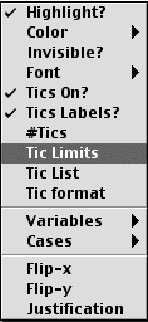
to correspond with each type of graphical component in any display. Middle-button selection
over an axis for example produces the pop-up menu of Figure .
In Quail, pop-up menus exist which are tailored to each kind of graphical component provided by the system. These are always available allowing the user to interact with every display as suits their fancy.
This kind of specialization is feasible because the software components of the graphic directly model the corresponding statistical graphical concepts. As with statistical concepts more generally, those constraints which naturally exist between concepts are encoded within the software representing those concepts typically, though not always, through a class inheritance hierarchy and method definition.