


Next: References
Up: Computational thinking for statisticians:
Previous: Summary of experience
Here we describe the student designed structure implemented for each node shown
in Figure ![[*]](http://www.math.uwaterloo.ca/latex2html-98/icons/cross_ref_motif.gif) . Excluded are those nodes uncompleted and
those nodes described in the text above.
The structure of each node is separated into three distinct descriptive pieces: initial
information displayed, viewed-object, activities available, and signposts.
. Excluded are those nodes uncompleted and
those nodes described in the text above.
The structure of each node is separated into three distinct descriptive pieces: initial
information displayed, viewed-object, activities available, and signposts.
Summary Stats
Initial display: Scrollable table of summary statistics for each variate
in the dataset.
Viewed-object: The dataset.
Activity: None.
Signposts: None. Terminal node.
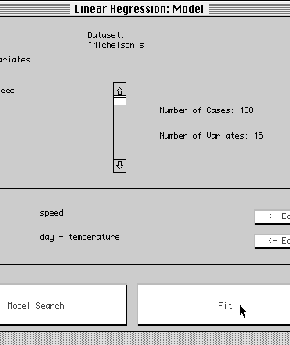
Linear Modelling Hub
Initial display: Dataset summary as in the regression hub and two editable
text fields - one for entering the name of the response variate, the other for
entering the linear predictor in extended Wilkinson-Rogers notation.
Viewed-object: Linear-modelling-hub
Activity: Editing the model formula to be used by the fit button.
Signposts: 1. ``Model Search'' leading to a corresponding hub (unimplemented) and
2. ``Fit'' which fits the specified model via least-squares and calls display
with signposts on the resulting fit-object.
Figure 4:
Modelling hub
 |
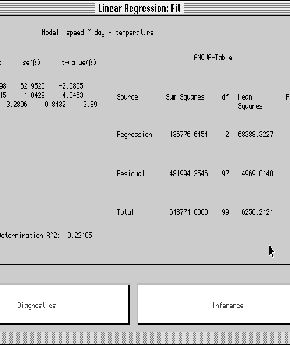
Display of Fit
Initial display: Two tables 1. the estimates, standard deviations, t-statistic
for each term in the model and 2. the Anova table including F-statistics and the
corrected R2 statistic.
Viewed-object: The least-squares fit-object which itself contains pointers
to a model-object, the dataset, and calculational details like a QR-decomposition
object. The whole hub is simply the result of calling display with signposts on the
fit-object which is of interest because fit-objects can appear as viewed-objects of
many other views (e.g. the curve displayed in a regression plot).
Activity: None.
Signposts: 1. ``Diagnostics'' and 2. ``Inference''
Figure 5:
Display of fit
 |
Diagnostic Hub
Initial display: Model formula. Boxplots of each variate in the dataset.
Viewed-object: Linear-regression-assessment object which itself contains pointers to
the fit-object.
Activity: None.
Signposts: 1. ``Influential Analysis'', 2. ``Collinearity Analysis'', and 3.
``Residual Analysis''
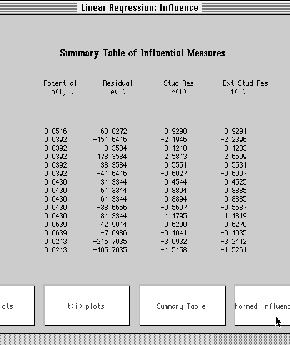
Influential Analysis
Initial display: Table containing case name, hii, least-squares residual,
studentized residual, and externally studentized residual. The table is scrollable
over the cases.
Viewed-object: The fit-object.
Activity: Buttons to replace table display by 1. hii vs. i and
 vs. ti (the externally studentized residual), 2. ti vs.
i and
vs. ti, and 3. Back to the table display.
vs. ti (the externally studentized residual), 2. ti vs.
i and
vs. ti, and 3. Back to the table display.
Signposts: 1. ``Normed Influence Measures''
Figure 6:
Influence analysis
 |
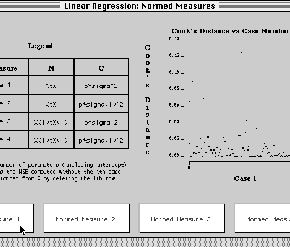
Normed Influence Measures
Initial display: Table showing the mathematical
definition of four normed influence
measures as described for example in Cook and Weisberg (1983) including ``Cook's
distance'' and ``DFFITS'' of Belsley et al (1980).
Viewed-object: The fit-object.
Activity: Four buttons, one for each normed measure in the table.
Pressing a button produces an index plot of that measure to the right of the table.
Signposts: None.
Figure 7:
Normed Influence measures
 |
Collinearity Diagnostics
Initial display: None
Viewed-object: collinearity-hub.
Activity: None.
Signposts: 1. Variance decomposition proportions, 2. Variance inflation factors,
and estimators' correlation matrix, 3. Signal to noise testing.
Variance decomposition
Initial display: 1. Table showing, the log10 condition indices
and a variance decomposition proportions table (see Belsley et al 1980, Belsley 1991).
2. A scrollable list of the terms in the model.
3. An editable list identifying the terms to be considered as the dependent
variate in an examination of auxiliary regressions (see Belsley 1991 for strategy).
4. A list of the auxiliary regression models already determined.
Viewed-object: variance-decomposition object.
Activity: Editing of the terms to be considered dependent in an auxiliary
regression analysis.
Signposts: 1. Fit the identified auxiliary regressions.
Figure 8:
Variance decomposition proportions
|
Auxiliary regression analysis
Initial display: 1. A list of all fitted auxiliary regression models having the
each specified term as the dependent variate.
Viewed-object: auxiliary-regression-analysis.
Activity: Fitted models may be selected.
Signposts: 1. Fit from the currently selected model can be displayed with signposts
V.I.F. and correlation
Initial display: 1. The correlation matrix for the coefficient estimators.
2. The variance inflation factors associated with each coefficient.
Viewed-object: vif-correlation-analysis.
Activity: None.
Signposts: None.
Residual Analysis
Initial display: None.
Viewed-object: The fit-object.
Activity: Offers three different types of residual examination. 1. Gaussian
qqplot, 2. Residuals vs. fitted values, and 3.Side by side of (a) residuals versus an
explanatory variate in the model and (b) Added variable plot for the effect of the
same explanatory variate. Separate buttons produce each of 1,2, or 3 in the display
area. A fourth button ``next'' cycles the side-by-side plots of 3 through the
explanatory variates in the model one at a time. Plot 3(b) has a ``lowess'' smooth
superimposed.
Signposts: None.
Figure 9:
Residual analysis
|
Inference Hub
Initial display: None.
Viewed-object: inference-hub.
Activity: None.
Signposts: 1. Hypothesis tests, 2. Confidence Intervals, 3. Prediction Intervals.
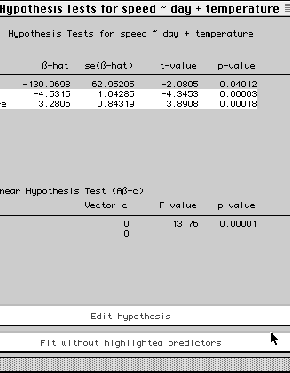
Hypothesis tests
Initial display: 1. Table of estimates, standard errors, t-statistics, and
significance levels for each coefficient in the regression.
2. Table of results for testing a general linear hypothesis.
Viewed-object: The fit-object.
Activity: 1. General linear hypothesis of the form
 can be tested. User is prompted for the matrix
 and
the corresponding vector
and
the corresponding vector
 .
Resulting F-statistic and significance level
are then displayed.
.
Resulting F-statistic and significance level
are then displayed.
2. Selecting terms in the teble of estimates can be tested for simultaneously being
zero. Results are displayed in terms of the corresponding general linear hypothesis.
Signposts: None.
Figure 10:
Hypothesis tests
 |
Confidence Intervals
Initial display: Table of estimates, standard errors, and 95%
confidence intervals for each coefficient in the regression.
Viewed-object: The fit-object.
Activity: 1. Change the confidence level.
2. Produce a confidence interval for an arbitrary linear combination of coefficients.
Signposts: None.
Prediction Intervals
Initial display: Table of estimates, standard errors
for each coefficient in the regression. A 95% prediction interval and a point
prediction for the
response at the pre-specified values of the explanatory variate (prompted for
at creation).
Viewed-object: The fit-object.
Activity: Change the prediction level.
Signposts: None.
Next: References
Up: Computational thinking for statisticians:
Previous: Summary of experience
2000-05-17